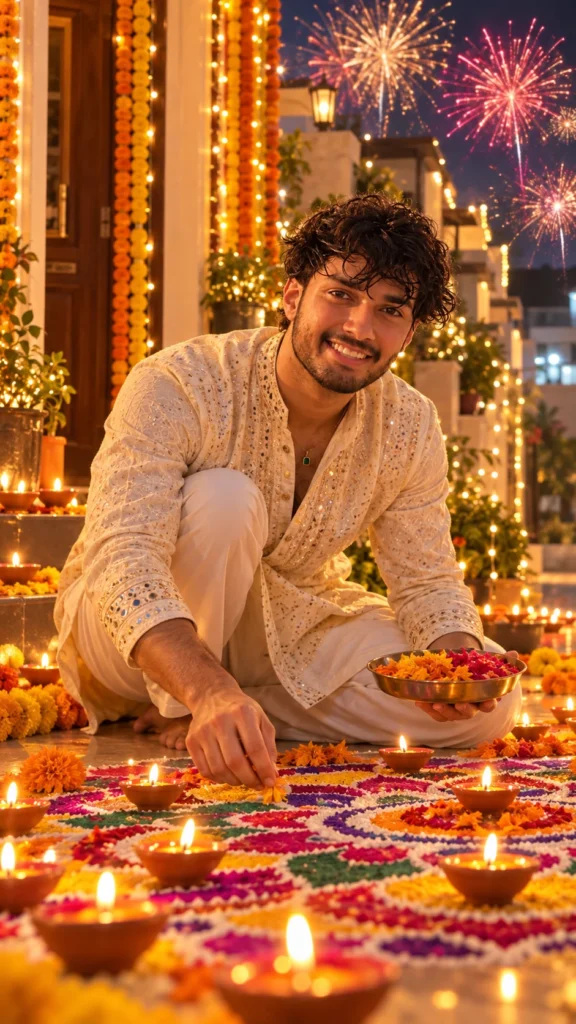
Create an image of the man in the reference photo, capturing his face and features as accurately as possible. He is making a large, intricate rangoli in front of his house, dressed in a traditional kurta and pajama. It is Diwali, and the sky is lit with vibrant fireworks, while numerous diyas surround the rangoli and are also placed on it, creating a festive, luminous atmosphere.
Diwali Rangoli Making AI Photo Prompt for Boys
A little color on the floor, a few diyas nearby, and the satisfaction of creating something by hand make a lovely Diwali moment. The Diwali Rangoli Making AI Photo Prompt for Boys is designed for creating a realistic festive photo of a boy making rangoli at home, capturing the creative side of Diwali rather than just the usual posed portrait.
This idea works well if you want a traditional festival photo for Instagram or WhatsApp, especially one that shows you taking part in the celebration.
What This Rangoli Photo Prompt Creates
The scene features a boy sitting or crouching beside a colorful rangoli design, carefully adding the finishing touches with colored powders. The rangoli might include a floral pattern, geometric shapes, or a traditional diya-inspired design. A few clay lamps and subtle festive decorations complete the setting.
The outfit can be a simple kurta-pajama or another traditional Indian look. Warm indoor lighting or soft evening light gives the scene a natural Diwali atmosphere, while the rangoli provides the main burst of color.
The most important detail is the activity itself. The hands should appear to be placing or arranging rangoli powder, rather than simply resting beside the design. This small detail makes the image feel more like a candid festival photograph.
How to Use the Diwali Rangoli Making AI Photo Prompt
- Copy the complete prompt provided on this page.
- Open ChatGPT or another AI image generator that supports photo uploads.
- Upload a clear photo of yourself if you want a personalized result.
- Paste the prompt and generate the image.
- Check the hand position, rangoli pattern, outfit, and facial details.
- If anything looks unnatural, adjust the pose or rangoli design and try again.
A clear reference photo can help the AI retain your appearance, although the result may vary between image generators.
Tips for Getting a Natural Rangoli Photo
Choose a Rangoli Design That Looks Realistic
A simple floral rangoli with a few bright colors can look more convincing than an extremely complicated pattern. You can also use a traditional symmetrical design with a diya motif in the center. Ask for visible colored powder and slightly textured edges to make the artwork look handmade.
Get the Hand Position Right
Since the boy is actively making rangoli, the hands should be close to the design and positioned as if carefully spreading colored powder. AI-generated hands can sometimes look awkward, so inspect the fingers and the interaction with the rangoli before using the image.
Wear Something Comfortable and Traditional
A plain white, cream, or pastel kurta works well because it does not compete with the colorful rangoli. For a more festive look, try a dark blue or green kurta with subtle embroidery. The clothing should suit the setting of someone participating in a family celebration.
Keep the Decorations Simple
Place a few diyas around the rangoli and add understated decorations in the background. Too many lights, flowers, and ornaments can make the scene look crowded. The rangoli and the person creating it should remain the main focus.
Use Warm, Natural Lighting
Soft lighting helps preserve the details of the rangoli powder and the fabric. If the scene takes place in the evening, include a gentle glow from the diyas without making the entire image overly orange or bright.
If you want the photo to resemble you, also ask the AI to preserve your original facial features, hairstyle, and skin tone.
Different Rangoli Photo Styles to Try
You can change the setting to match the kind of Diwali moment you want to create.
- Traditional home entrance: Make a rangoli near the front door with clay diyas on either side.
- Modern festive look: Use a clean floor, a geometric rangoli pattern, and a simple kurta.
- Family celebration: Add a softly blurred festive background that suggests other family members are preparing for Diwali.
- Candid close-up: Focus on your hands creating the design, with your face visible naturally in the frame.
A vertical 4:5 composition is suitable for Instagram posts, while a 9:16 frame works better for Stories and Reels covers.
Where to Use Your AI Rangoli Photo
A finished rangoli portrait can be shared as an Instagram post, WhatsApp display picture, Facebook update, or part of a digital Diwali greeting. It is also a nice way to represent the creative traditions of the festival rather than relying only on photos of outfits and decorations.
For a social media post, keep the rangoli and your face visible within the central area of the image so that neither gets cropped in the preview.
Create Your Diwali Rangoli Photo with AI
The charm of this photo idea comes from showing a real festival activity. A colorful handmade rangoli, a few glowing diyas, and a natural pose can tell the story of Diwali without an elaborate background.
Try the Diwali Rangoli Making AI Photo Prompt for Boys to create a festive portrait that captures the tradition of decorating your home for Diwali.
Read Also
- Durga Puja Prompt for Girls
- Navratri AI Photo Prompt for Girl
- Garba Dance AI Photo Prompt for Girl
- Navratri Garba Girl Colorful Chaniya Choli Dandiya
- Navratri Garba Girl Playing Dandiya at Night
- Navratri Dandiya Girl Colorful Lehenga Portrait
- Navratri Garba Girl Traditional Lehenga at Temple
- Navratri Garba Man Traditional Kurta Portrait
- Navratri Garba Couple Playing Dandiya
- Navratri Garba Couple Pink Outfit Dandiya